 Flows ERP
Collection files & lawsuit casesfrom first call to court
Every call, visit, and promised payment date goes into one file per contract.
One-month free trial before you buy.
01
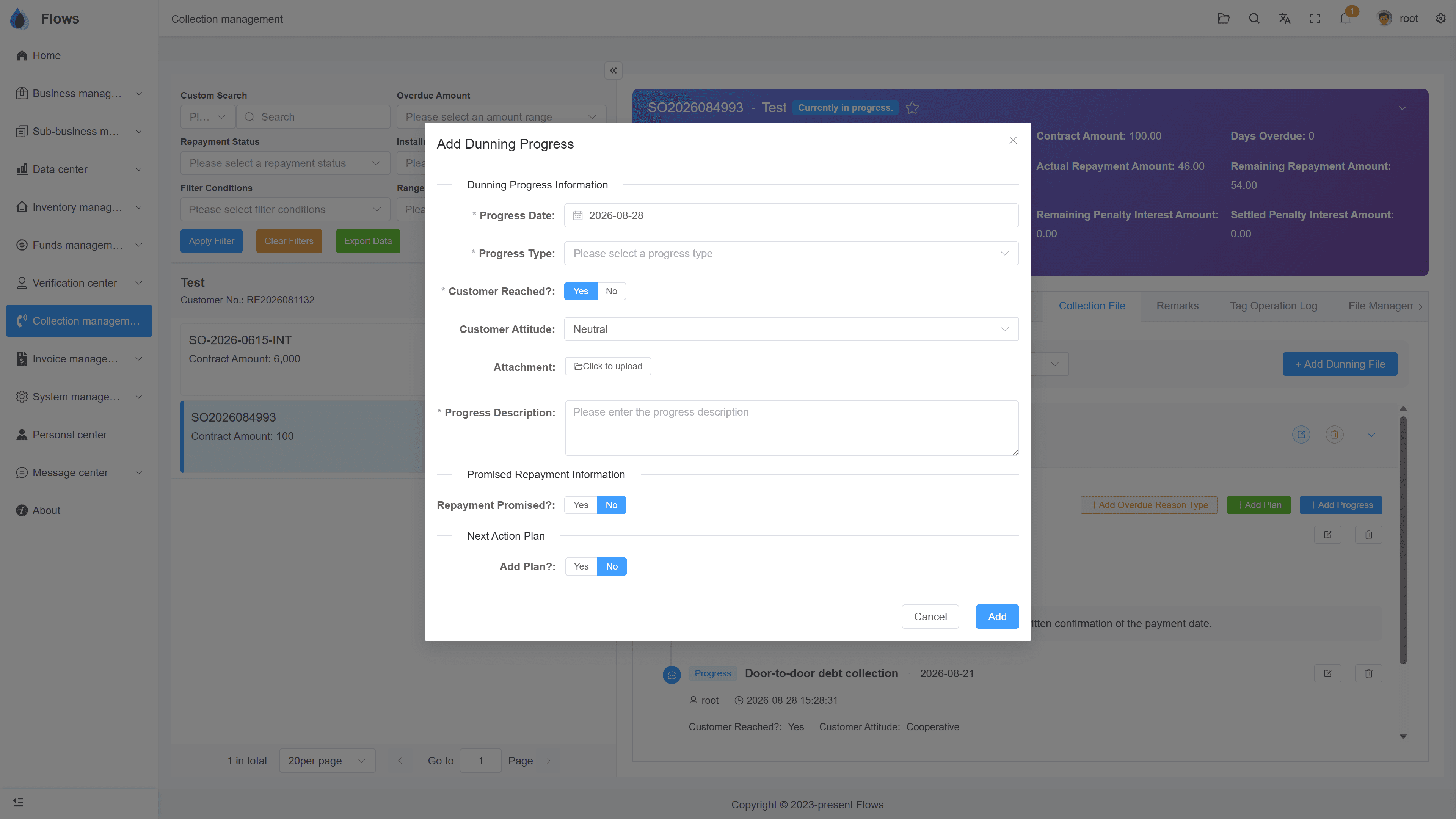
Collection files with progress and next steps
Give each overdue contract its own collection file. Record every call, visit, or letter with the date, how the customer responded, and any attachments, then plan what to do next, so your team always knows the next step.
- Progress entries with date and type
- Customer reached & attitude
- Next-step plans
- Several files per contract, history kept
Collection record — TCH Motors
Penalty accrued
฿69,820
Daily at 15% p.a. · 43 days overdue
02
Promised payment dates go into the calendar
When a customer promises to pay on a certain date, record it in the collection file. Flows adds the date to the calendar as a reminder, so your staff follow up on that day.
- Record the promised date
- Reminder created automatically
- Shown in the calendar
- No follow-up forgotten
Demand letter — TCH Motors
03
Lawsuit cases on a timeline
If a case goes to court, add a lawsuit case with the court, filing date, defendant, lawyers, and cause of action. Then record each stage on the case timeline — hearings, first and second instance, judgment, and enforcement.
- Court, parties & lawyers
- Several cases per contract
- Stages on a timeline
- Documents attached to each stage
Penalty interest — live balances
Accrues daily by each contract's own rules
Per-period history · payable by cheque too
Inside the module
Real screens from Flows ERP — what your team will actually work in.
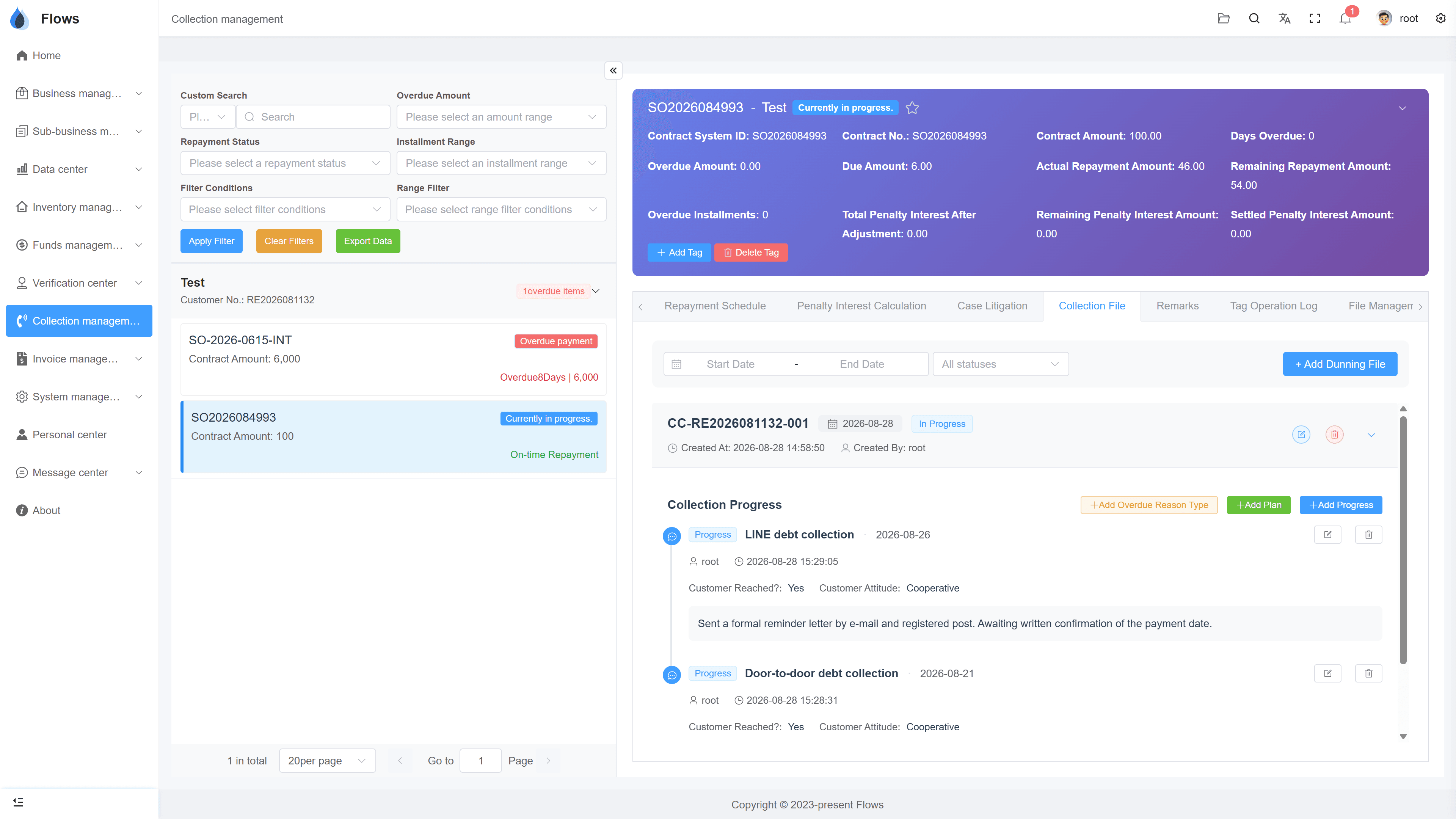
Collection file with its progress
Each follow-up — a LINE message, a visit — with who recorded it, when, whether the customer was reached, and their attitude.
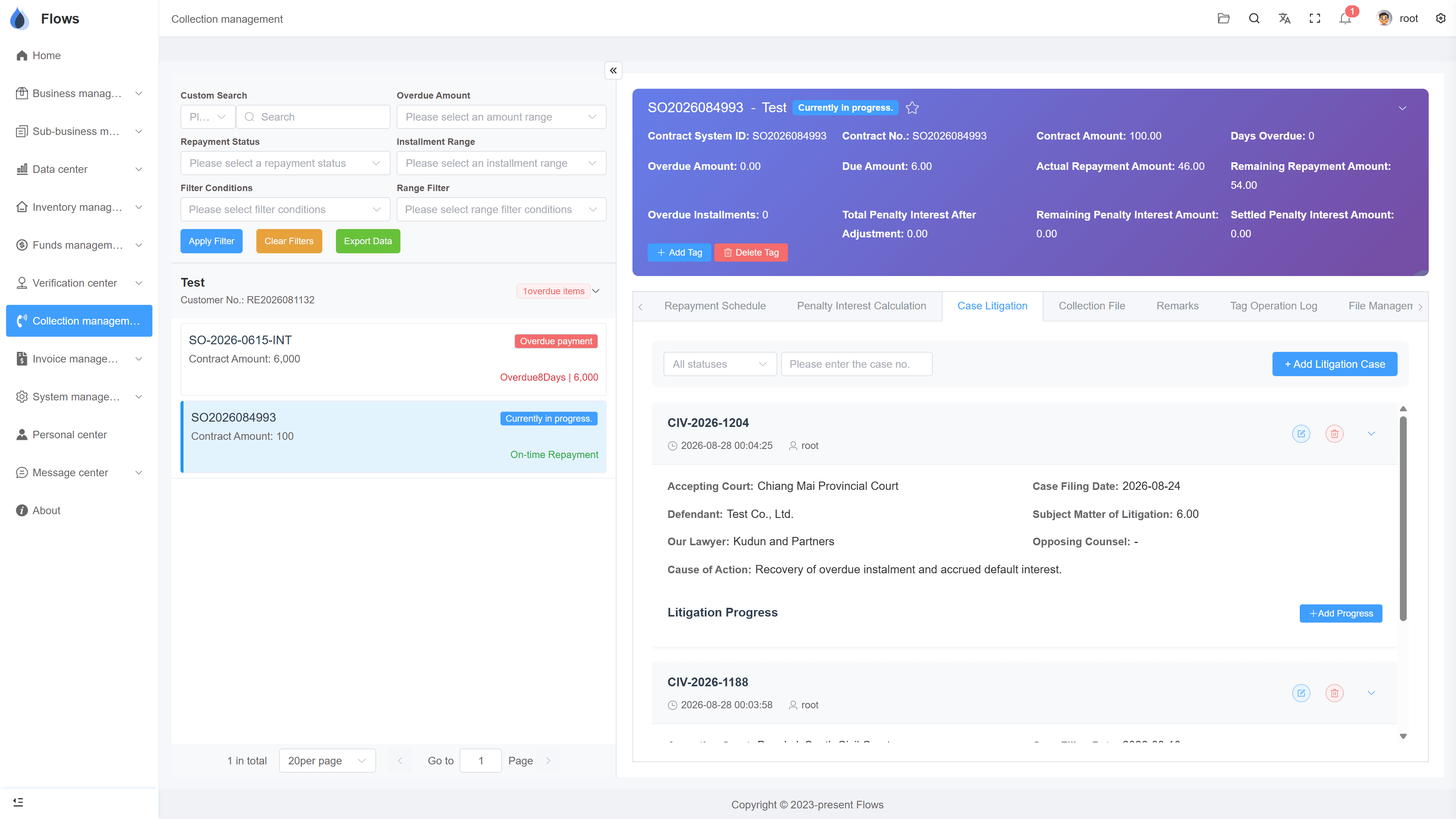
Lawsuit case records
The court, filing date, defendant, lawyers, cause of action, and litigation progress for each case.
Why Flows
What makes Flows different
Not another generic ERP — a system built around how Thai SMEs actually buy, sell, and collect.
See how onboarding works →Priced per company, not per seat
One annual price, every module included. Add users freely within your tier — no feature gates, no seat fees.
Three languages with auto-translation
Thai, English & Chinese UI — and the data your team enters is translated automatically, so everyone reads the same records.
Your documents, exactly your format
Send us your invoice and receipt templates; our team configures them into Flows. Every document comes out looking like yours.
We walk you live — and stay
Five-step onboarding at no extra cost, then quarterly system stability reports. We don't disappear after go-live.
Spec sheet
What collection files & lawsuit cases include — in every plan.
Collection files
Every file kept on record
Progress entries
Every detail and result of your talks with the customer
Next steps
Add a plan for the next collection step
Promised payments
If a customer promises to pay, the system reminds you on that date
Overdue reasons
Record why a customer is overdue
Lawsuit cases
Court, filing date, defendant, lawyers, cause of action
Lawsuit progress
Hearings, first and second instance, judgment, enforcement
Access
Only the colleagues involved can see collection records
Frequently asked questions
What is a collection file in Flows ERP?
A collection file records one round of collection for an overdue customer. It holds every follow-up, such as calls, visits, LINE messages, and demand letters, along with the next steps and any payment date the customer promised.
Can one customer have several collection files?
If a customer pays and later falls overdue again, you simply open a new collection file. Earlier files are kept, so the full history stays visible.
What happens when a customer promises to pay on a certain date?
Record the promised date in the collection file, and Flows adds it to the calendar as a reminder. Your staff are then reminded to follow up on that day.
How are lawsuits recorded?
Add a lawsuit case with the court, filing date, defendant, lawyers, and cause of action. Then record each stage, such as hearings, first and second instance, judgment, and enforcement, on the case timeline.
Can we attach documents, such as a demand letter?
You can attach files to any progress entry or lawsuit stage. All collection documents are also kept together in the collection document archive.
Who can see a customer's collection records?
You decide this with permissions, for example so that only the collections team can see them. Everyone else simply won't see the records.
Keep every collection case in order.
Start a free one-month trial, or book a demo with a real overdue case and we'll set up its collection file together.