 Flows ERP
Sales contracts (AR)from signing to fully paid
Everything starts from the sales contract. It links stock going out, receivables, payments received, and overdue follow-ups.
One-month free trial before you buy.
01
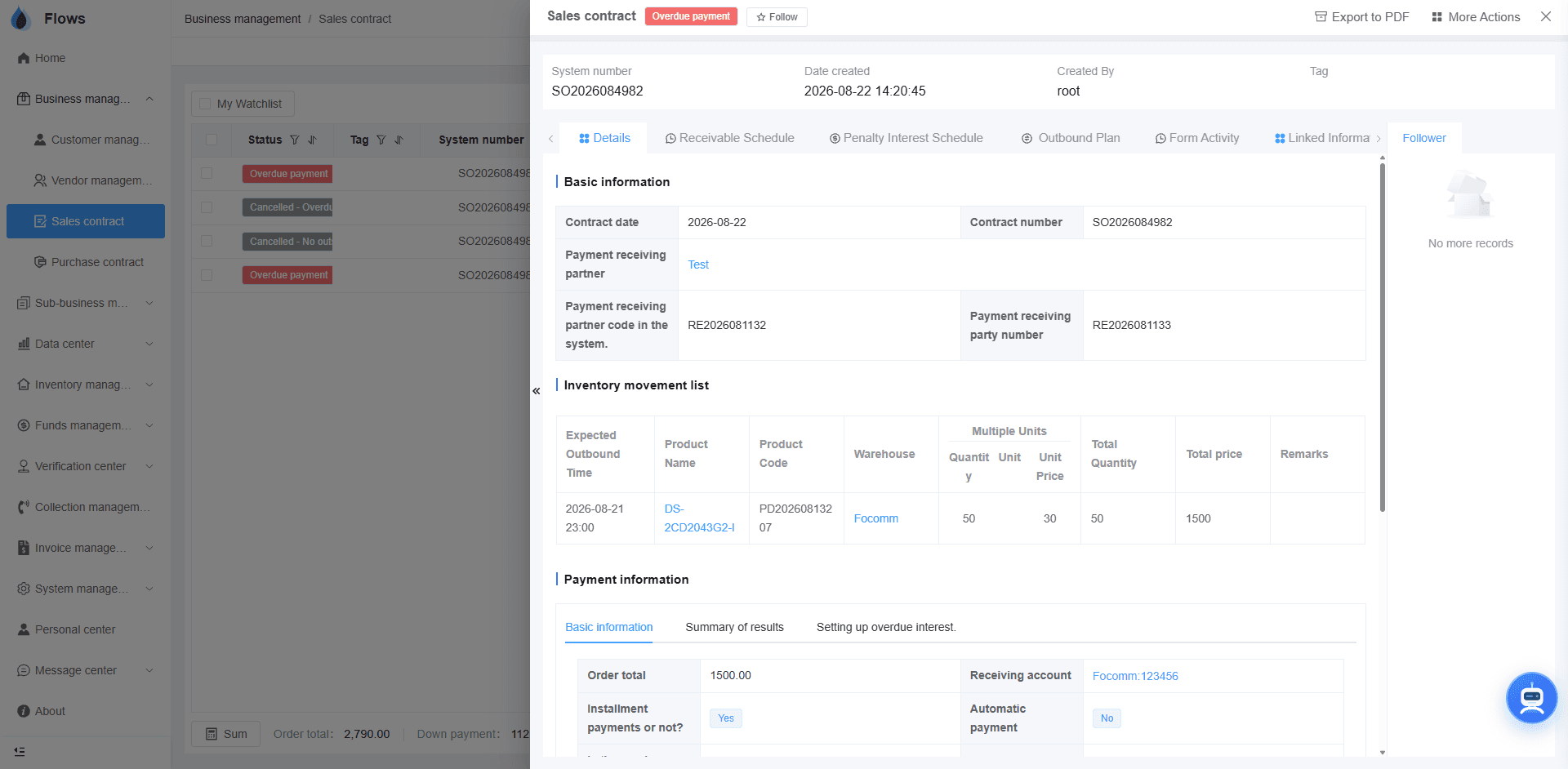
The whole contract on one screen
See the salesperson in charge, the customer's credit term, and the delivery schedule on one screen. Colleagues can follow up together, and every edit to the contract is saved.
- Products & quantities per line
- Upload any attachment, e.g. scanned contracts
- Follow-ups with @ mentions
- Full edit history
Contract SC-2026-041 · Bangkok Trading
@Somchai please follow up period 3
Logged on the contract · visible to the team
02
Payment plans — with interest or without
Set the terms once and the schedule is generated for you. Equal principal, equal installment on the reducing balance, flat rate, or interest-free credit terms — each period gets its own amount, due date, and reminder.
- 4 interest methods incl. interest-free
- Down payments & custom periods
- Reminders per period
- Plan changes recorded
Payment plan · 6 periods · equal installment (reducing balance)
03
Contract templates that fit your business
Set up contract templates around the way your business works. There is no limit on the number of templates, and you can add your own fields to each one.
- Unlimited contract templates
- Custom fields on each template
- Built around your business
- No coding needed
Generate documents
Generated from contract SC-2026-041
On your company template · TH/EN/ZH
Inside the module
Real screens from Flows ERP — what your team will actually work in.
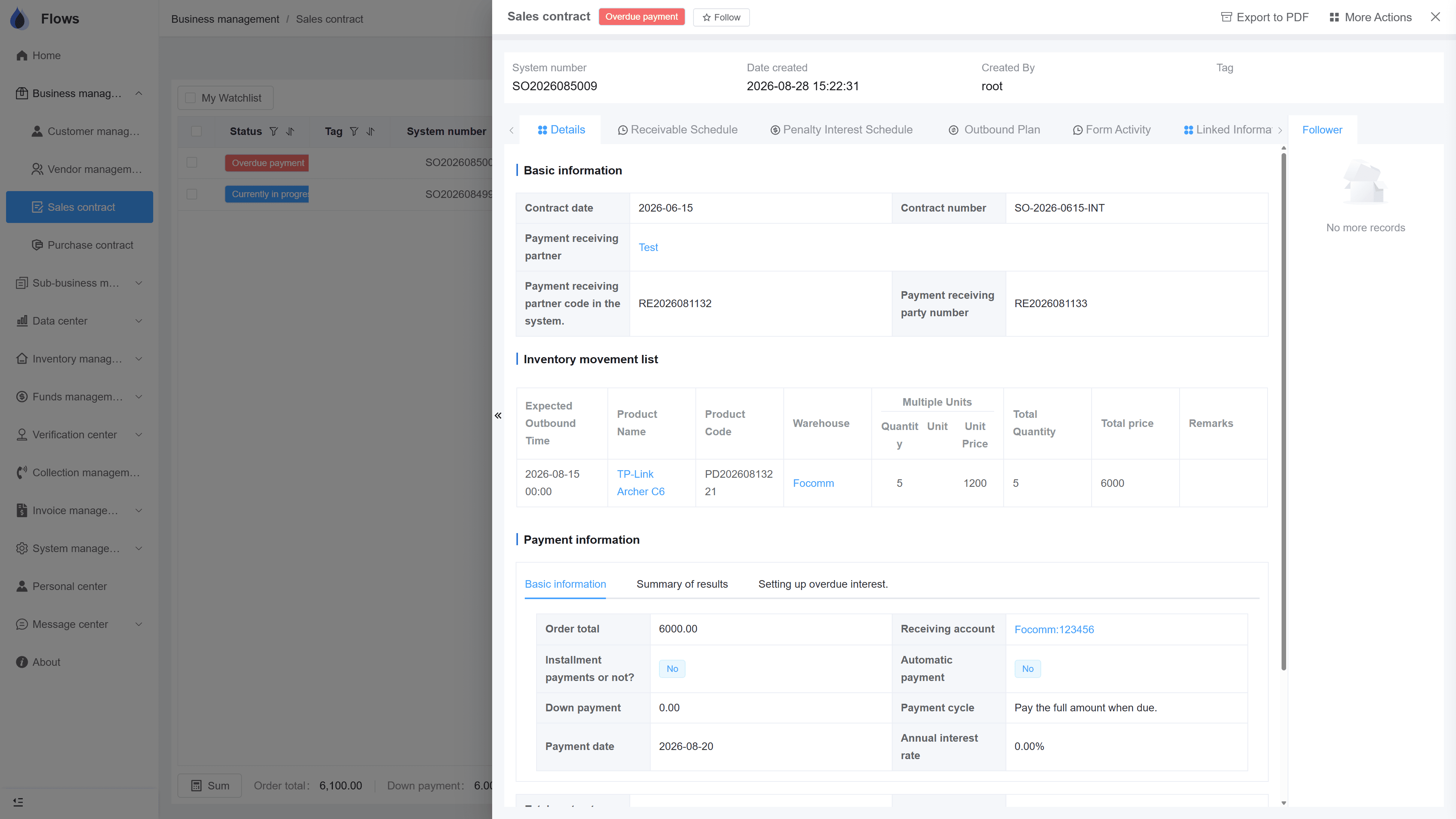
Contract detail with tabs
One contract, five tabs: details, payment plan, penalty interest, delivery, and history — everything in one place.
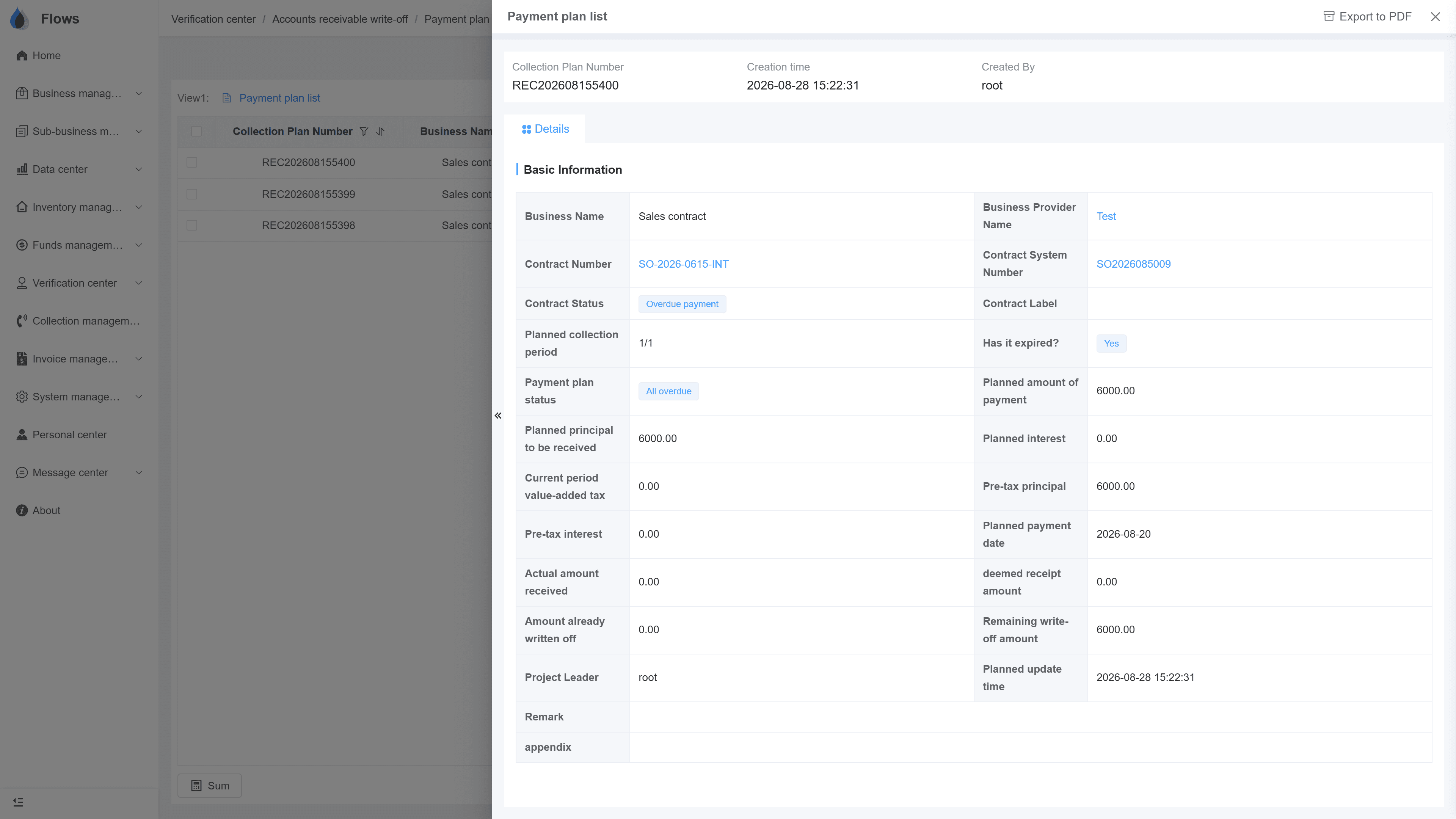
Write-off against the plan
Pick the period, enter the amount — partial or full. The outstanding balance updates right away.
Why Flows
What makes Flows different
Not another generic ERP — a system built around how Thai SMEs actually buy, sell, and collect.
See how onboarding works →Priced per company, not per seat
One annual price, every module included. Add users freely within your tier — no feature gates, no seat fees.
Three languages with auto-translation
Thai, English & Chinese UI — and the data your team enters is translated automatically, so everyone reads the same records.
Your documents, exactly your format
Send us your invoice and receipt templates; our team configures them into Flows. Every document comes out looking like yours.
We walk you live — and stay
Five-step onboarding at no extra cost, then quarterly system stability reports. We don't disappear after go-live.
Spec sheet
Everything the sales-contract module includes — in every plan.
Interest methods
Equal principal · equal installment (reducing balance) · flat rate · none
Credit terms
30 / 60 / 90 days or any custom term
Payment plan
Any number of periods, down payment, editable with audit log
Import / export
Excel templates with validation reports
Languages
Thai · English · Chinese UI, auto-translation
Collaboration
@ mentions, follow-up thread, button-level permissions
Frequently asked questions
Does Flows support installment sales with interest?
Flows supports installment sales with four options: equal principal, equal installments on a reducing balance, a flat rate, or no interest with a credit term. You pick one on the contract, and the schedule is generated for you.
What is the difference between flat rate and reducing balance?
A flat rate charges interest on the original amount for the whole term, so every period's interest is the same. A reducing balance charges interest on what is still owed, so it gets smaller as the customer pays, and Flows supports both.
Does Flows support credit terms?
You can set a credit term on the contract, such as 30, 60, or 90 days or any period you choose. Each due date and reminder then follows that term, with no interest added.
How do I create a payment schedule for a customer?
Open the contract, enter the amount, the number of periods, and the interest method, then click generate. Flows builds the full schedule with amounts and due dates, and you can adjust it before saving.
How do invoices relate to the sales contract?
Invoices are generated straight from the contract. You pick the contract and the document type, such as an invoice, billing note, tax invoice, or receipt, and Flows fills in your template, so the numbers always match.
How can I track which customers haven't paid?
The collections module shows which customers have overdue payments across all your contracts. Overdue periods also send alerts automatically, so nothing slips past.
Can we import existing contracts from Excel?
Flows provides Excel import templates for contracts, customers, suppliers, and products, and checks every row for errors. Your team can import the contracts and then review them to make sure the data is accurate, and we can help if needed.
Put your next deal in Flows.
Start a free one-month trial, or book a demo and bring one of your real contracts — we'll set it up together.