 Flows ERP
Cash managementevery account in one place
See every account's balance at a glance, and keep Flows in line with your bank.
One-month free trial before you buy.
01
Transfers and daily expenses
Record transfers between accounts, daily expenses like rent and utilities, and other income — and the balances in Flows always match your bank.
- Transfers between accounts
- Daily expenses with categories
- Other income recorded
- Balances match your bank accounts
AR write-off center
02
Low-cash alerts
Set a minimum balance for each account. When an account falls below it, Flows will alert you, so you can plan the next step before money gets tight.
- Set your own limit
- Alert when cash runs low
- Plan payments in time
- Balance per account
Contracts — money in & money out
Sales · money in
78% collected
Purchases · money out
55% paid on plan
Net cash this month
+฿204,100
03
See your cash flow ahead
The data center shows money in and out, compares plan with actual, and forecasts the coming months from your contracts.
- Money in vs. out
- Plan vs. actual
- Forecast from contracts
- Balance per account
Sales revenue — last 6 months
Revenue · Aug
฿4.2M
+18% vs last month
Gross margin
32.4%
Overdue receivables
฿310K
-22% vs last month
Inside the module
Real screens from Flows ERP — what your team will actually work in.
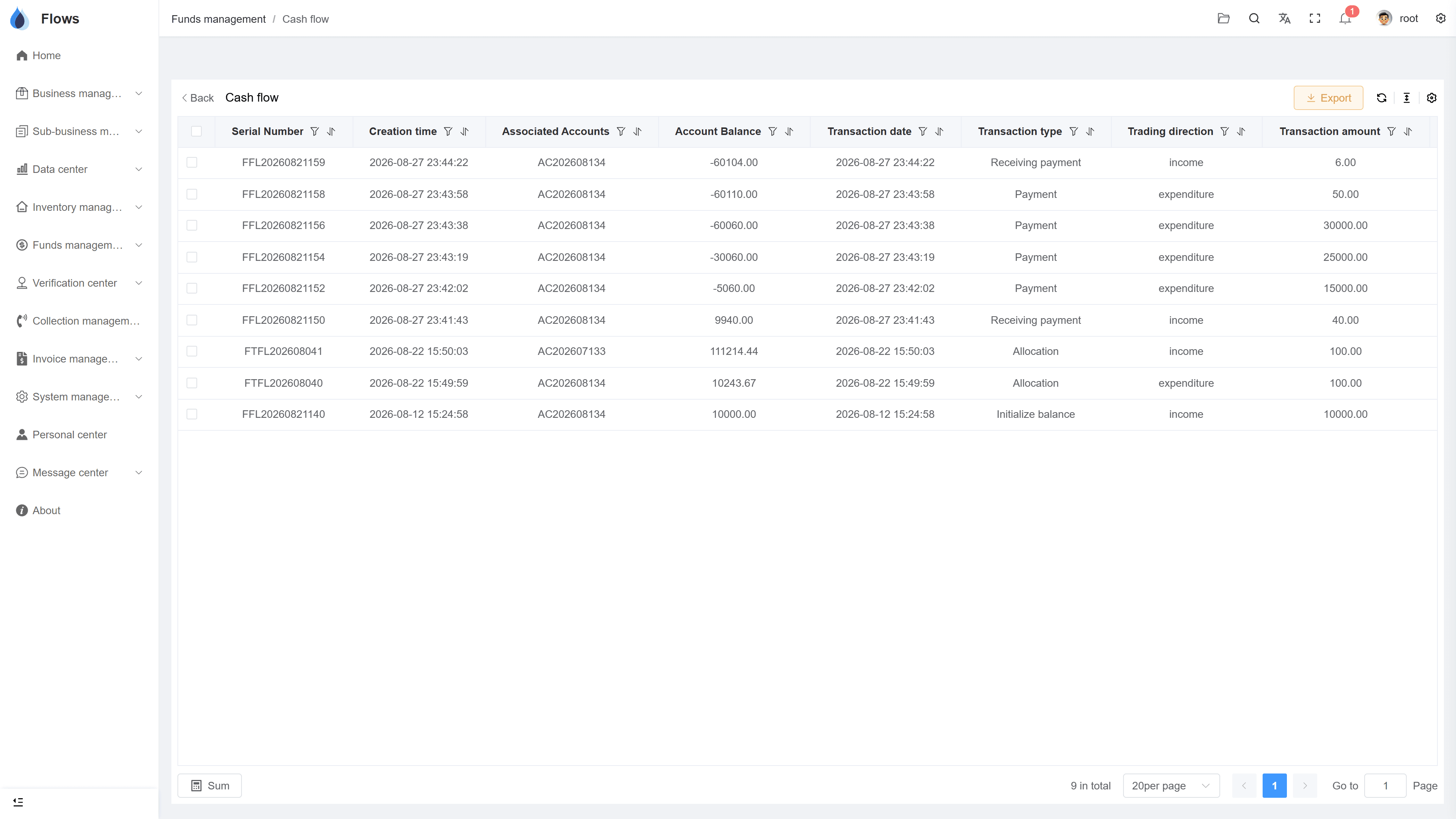
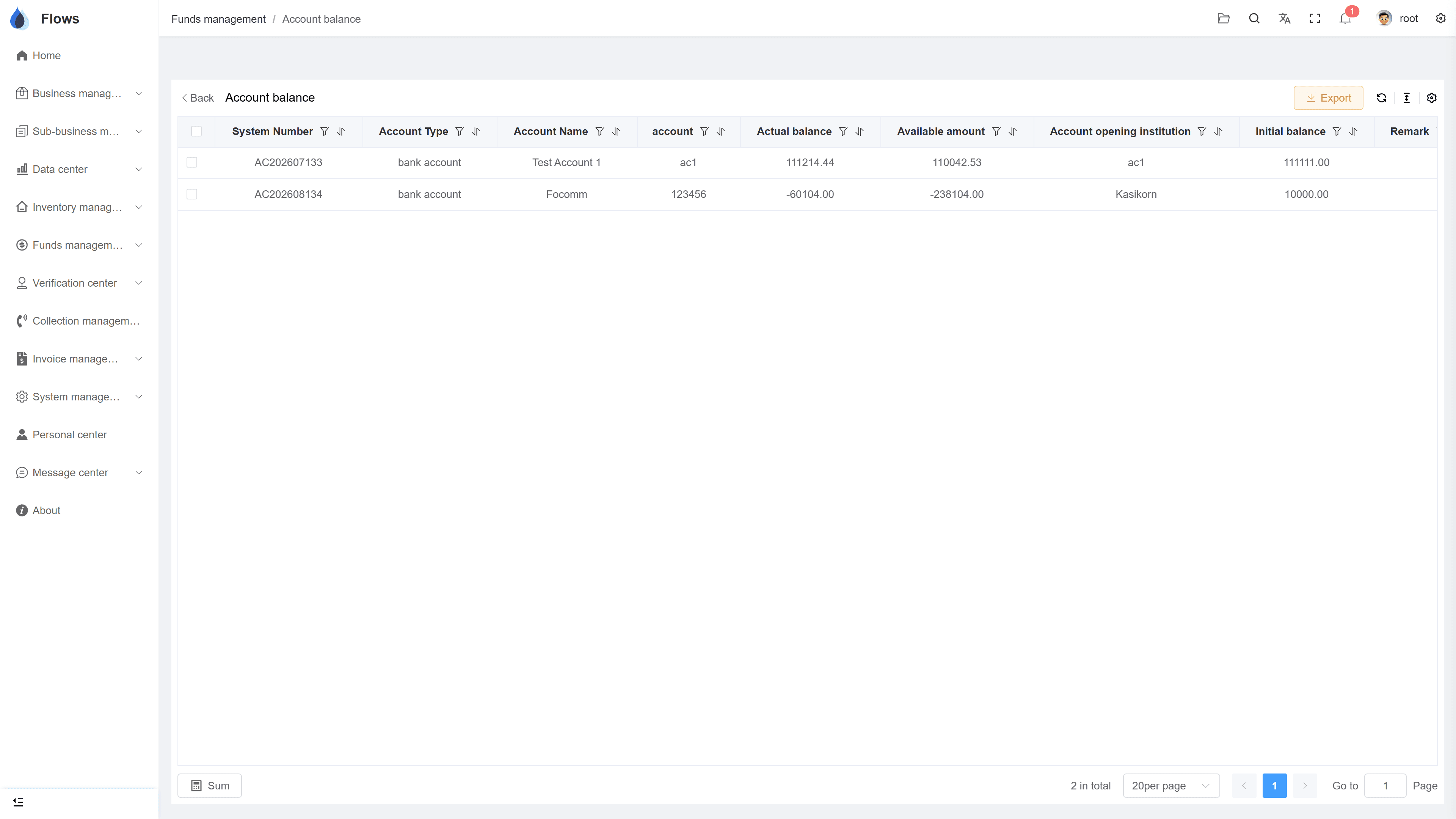
Account balances and movements
Each account's balance with its recent movements.
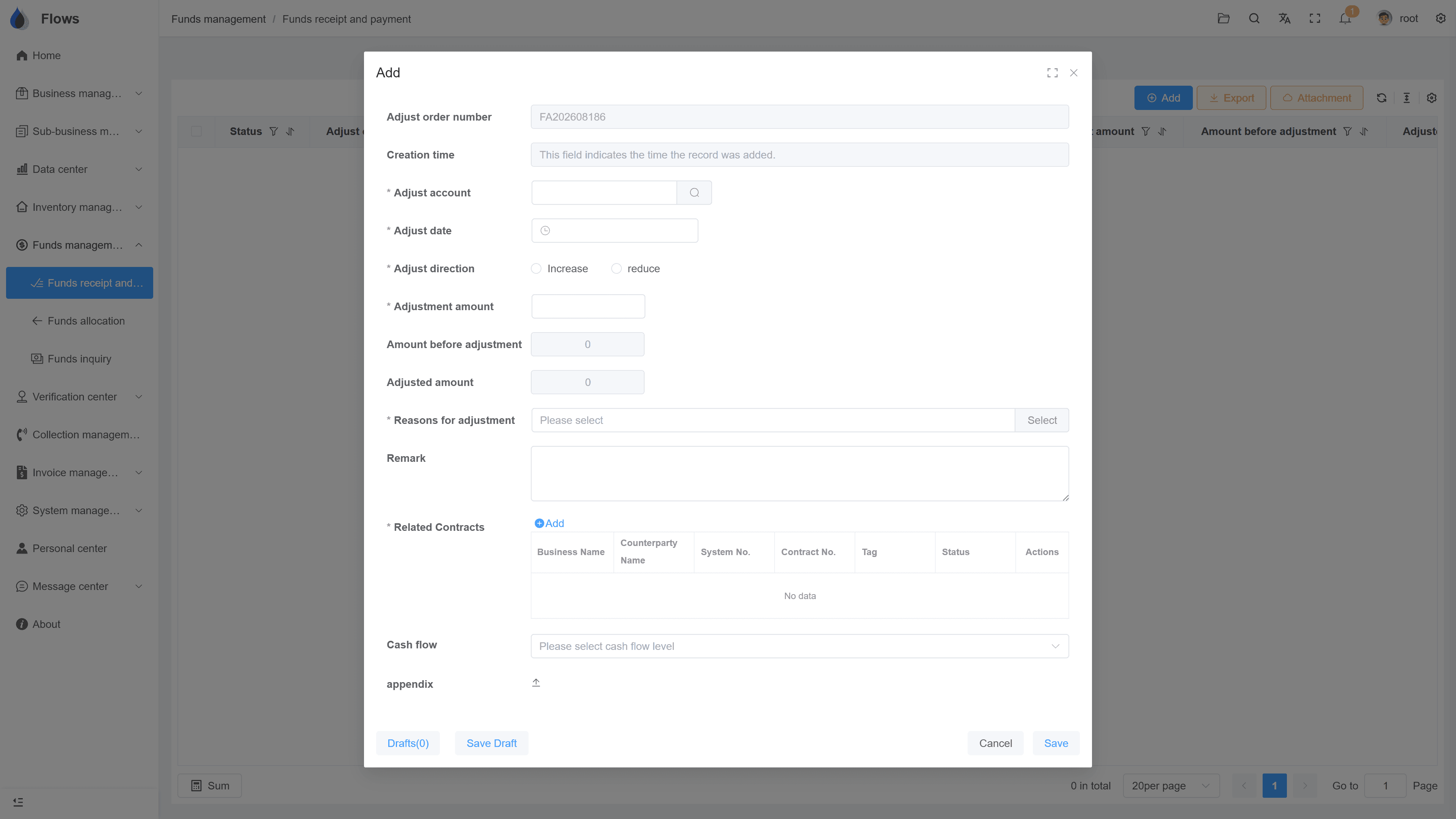
Recording an expense
Rent, utilities, supplies — recorded with a category and shown in the account balance right away.
Why Flows
What makes Flows different
Not another generic ERP — a system built around how Thai SMEs actually buy, sell, and collect.
See how onboarding works →Priced per company, not per seat
One annual price, every module included. Add users freely within your tier — no feature gates, no seat fees.
Three languages with auto-translation
Thai, English & Chinese UI — and the data your team enters is translated automatically, so everyone reads the same records.
Your documents, exactly your format
Send us your invoice and receipt templates; our team configures them into Flows. Every document comes out looking like yours.
We walk you live — and stay
Five-step onboarding at no extra cost, then quarterly system stability reports. We don't disappear after go-live.
Spec sheet
What cash management includes — in every plan.
Accounts
All company bank accounts, with opening balances
Balances
Updated by payments, receipts, transfers, and expenses
Transfers
Between accounts, both sides recorded
Expenses & income
Daily expenses and other income, with categories
Low-cash alert
Alert when cash falls below your limit
Cash-flow dashboard
Money in vs. out, plan vs. actual
Logs
Every movement recorded with user and time
Export
Balances and movements exportable to Excel
Frequently asked questions
What's the difference between cash flow and profit?
Profit counts what you earned, while cash flow counts the money that actually came in and went out. A profitable month can still leave you short of cash if customers haven't paid, which is why Flows ERP takes cash-flow management so seriously.
Can we record daily expenses such as rent and utilities?
You can record office rent, utilities, supplies, and other daily expenses by category, and other income works the same way, which keeps your account balances correct.
Can Flows warn us when cash is running low?
Yes, you can set a minimum balance for each account, and Flows alerts you when the balance falls below it, so you can plan payments in time.
How do we set opening balances when we start?
During onboarding, enter each account's balance as of your go-live date. From then on, Flows keeps the balances up to date, and most teams check them against the bank statement before go-live.
Can we see how much cash we will have in the coming months?
Yes, the cash-flow dashboard in the data center forecasts the money coming in from your contracts' payment plans, so you can see the months ahead.
Know your cash position at any time.
Start a free one-month trial, or book a demo and set up your accounts to see how it works.